

Key takeaways
- Identity verification for online exams confirms the registered candidate is the person taking the whole exam, not just the person who logged in.
- The strongest setups layer photo ID, a face match, continuous face matching, liveness checks and, for high stakes, a live check-in.
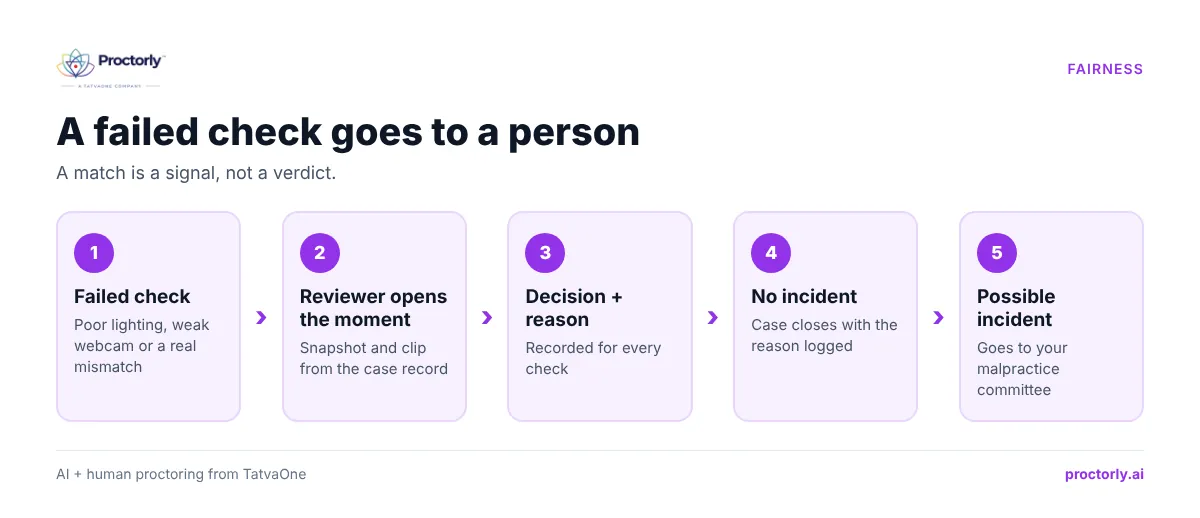
- A failed check should go to a person. Poor lighting or a weak webcam can look like a mismatch.
- Match the depth of checks to the exam’s stakes so low-stakes quizzes stay quick.
- Store as little biometric data as possible, for as short a time as possible, in your region.
Ask an exam controller what keeps them up at night and impersonation is near the top of the list. A login and password prove someone knows the credentials. They prove nothing about who is answering the questions. For entrance tests, final exams and certifications, that gap is where the most damaging fraud happens.
Worried about proxy candidates in your next exam? Book a meeting to review your identity setup.
What is identity verification for online exams?
Identity verification for online exams is the set of checks that confirm the registered candidate is the person sitting the exam from start to finish. It typically combines photo ID capture, a face match at check-in, continuous face matching during the session, liveness checks against photos or videos, and a live proctor check for high-stakes tests.
The idea mirrors how identity proofing works in other digital services. NIST’s digital identity guidelines describe proofing as collecting evidence, validating it and verifying it belongs to the person claiming it (NIST SP 800-63A-4). Online exams apply the same logic, with one extra requirement: the check has to hold for the whole session.
How impersonation happens in online exams
- Full proxy: someone else takes the entire exam using the candidate’s login.
- Swap after check-in: the real candidate verifies, then hands over to a proxy.
- Remote helper: the candidate stays on camera while someone controls the computer remotely.
- Spoofed camera: a photo or pre-recorded video is shown to the webcam.
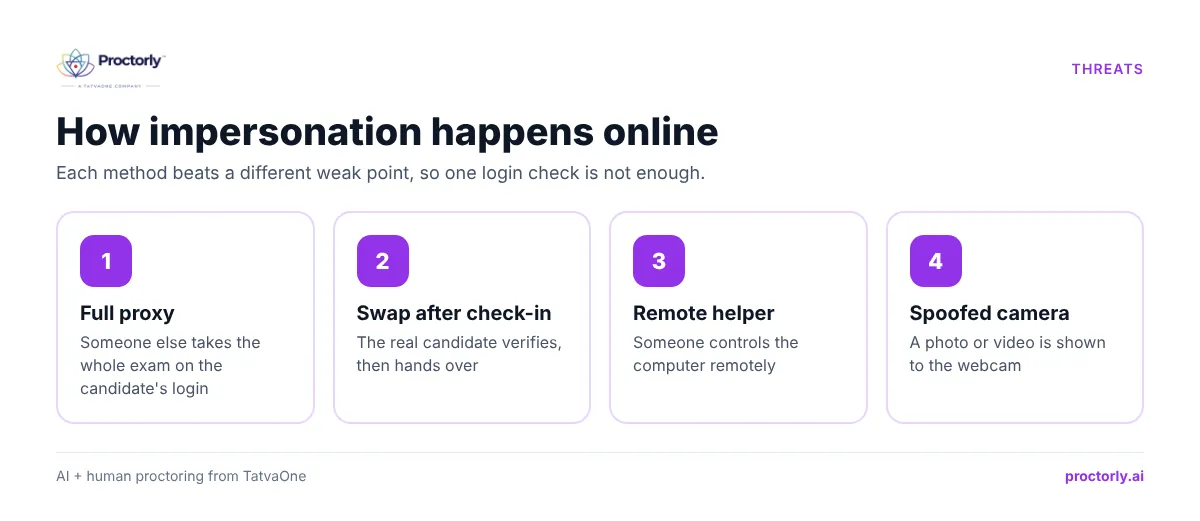
Each method beats a different weak point, which is why one check at login is not enough.
The five layers of candidate identity verification
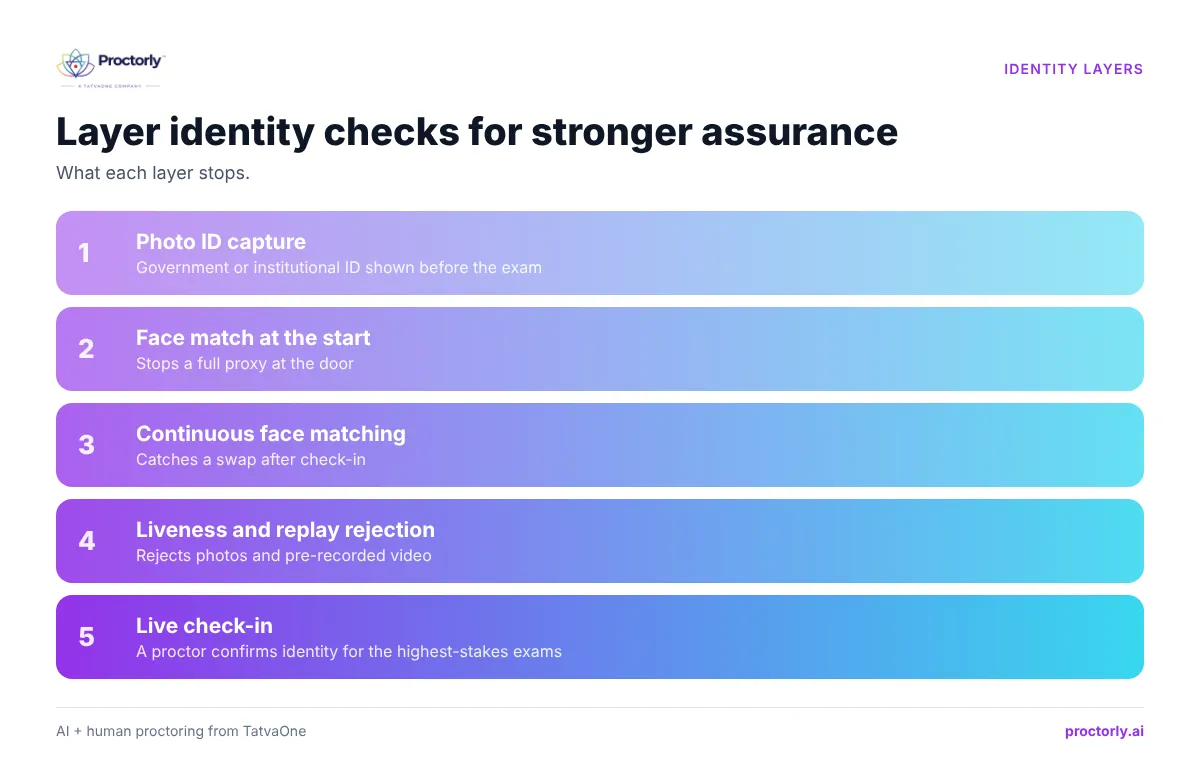
Photo ID capture
The candidate shows a government or institutional ID to the camera before starting. Proctorly lets you make this required or optional per exam.
Face match at the start
The live face is compared with the ID photo or a reference image. This stops a full proxy at the door.
Continuous face matching
The face is checked again throughout the session. This catches a swap after check-in, which a login-only system misses entirely.
Liveness and replay rejection
Photos or videos held up to the camera are rejected. For high-stakes exams, a short active liveness challenge before the exam adds another barrier.
Live check-in
For certification and licensing, a live proctor confirms identity before the candidate begins. Combined with detection of remote-access software, this also addresses the remote-helper method.
See all five layers on the Proctorly identity page.
Watch a live check-in and continuous face match in action. Book a Proctorly demo.
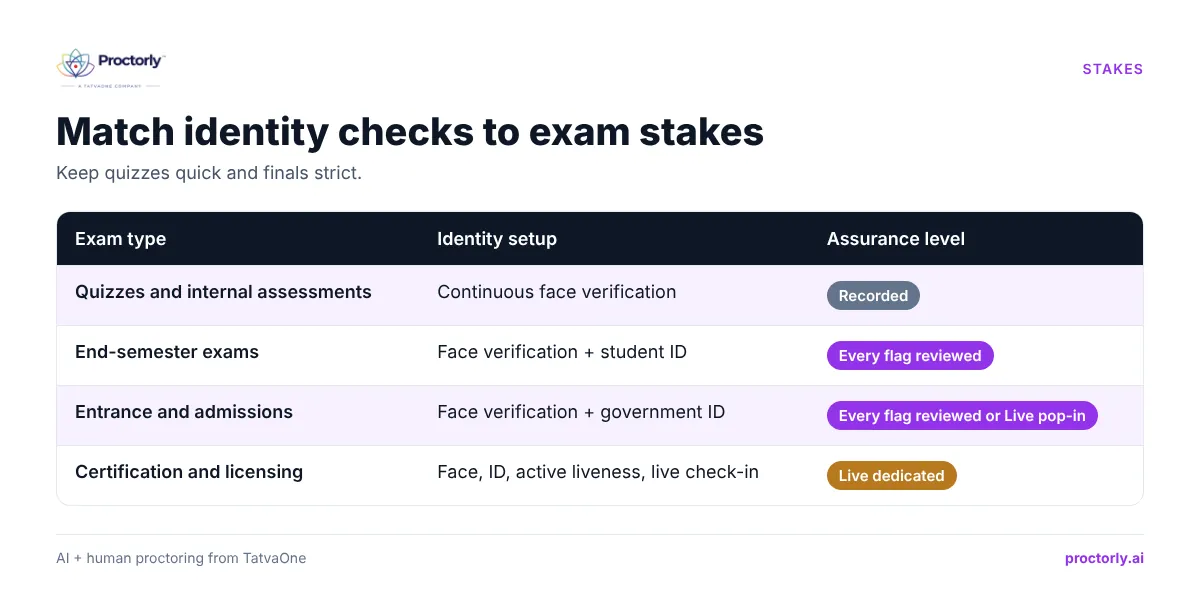
Matching identity checks to exam stakes
| Exam type | Identity setup | Assurance level |
|---|---|---|
| Quizzes and internal assessments | Continuous face verification | Recorded |
| End-semester exams | Face verification + student ID | Every flag reviewed |
| Entrance and admissions | Face verification + government ID | Every flag reviewed or Live pop-in |
| Certification and licensing | Face, ID, active liveness, live check-in | Live dedicated |
For admissions specifically, see how remote proctored entrance exams combine identity checks with human review.
Fairness and privacy: getting identity right
A match is a signal, not a verdict. Failed checks can come from poor lighting, a low-quality webcam or a dropped connection. In Proctorly, any failed check goes to a person, who reviews the moment and records a decision. Only confirmed incidents reach your malpractice committee.
Collect less, keep it shorter. Good practice is to store face checks as hashed signatures rather than raw images where possible, let the institution set retention for ID images and recordings, and host data in the candidate’s region. Proctorly follows this approach and does not use candidate data to train AI unless the institution opts in. It also does not infer emotion, personality or intent from faces. Details are in the Trust Center privacy page.
Plan alternatives. Some candidates cannot use face verification. Agree an alternative route in advance rather than on exam day.
A 6-step identity verification setup
- Classify each exam by stakes.
- Choose identity layers per exam using the table above.
- Tell candidates which ID to bring and how checks work.
- Ask candidates to run a system check and webcam test.
- Agree who reviews failed checks and how fast.
- Set retention periods for ID images and recordings, and publish them.
People also ask
How do online exams verify identity? Through photo ID capture, face matching at check-in and during the exam, liveness checks and sometimes a live proctor check-in.
Can someone else take my online proctored exam? Not easily when continuous face matching and remote-access detection are on. Login-only systems are far easier to beat.
Is facial recognition required for online exams? Not always. Many institutions use face verification for higher-stakes exams and lighter checks for quizzes.
FAQs
What happens if a candidate’s face check fails?
A trained reviewer looks at the flagged moment and records a decision with a reason. A failed check is never an automatic fail.
Does Proctorly store students’ face images?
Face checks are stored as hashed signatures, and only when an institution runs repeat exams for the same students. Your institution sets retention for ID images and recordings.
Can we verify identity without government ID?
Yes. For internal exams, institutional ID or continuous face verification alone is common. Book a meeting to decide the right setup per exam.
Does identity verification work on low bandwidth?
Proctorly runs on 512 Kbps down and 128 Kbps up with a standard webcam, no extra hardware.
Make sure the right person sits every exam
Identity is the foundation of every other exam control. Layer the checks, keep a person behind every failed check and collect only what you need. Your results will hold up, and honest candidates will barely notice.
Close the impersonation gap. Book a Demo or Book a Meeting.