

Key takeaways
- Online proctoring for certification exams combines identity checks, a locked exam environment, live or recorded monitoring and human review so a remote result carries the same weight as a test-centre result.
- High-stakes credentials need live check-in, continuous face matching and a proctor watching the session, not just automated flags.
- No automated flag should fail a candidate. A trained person should decide, and record why.
- An exportable evidence pack is what makes a remote exam defensible when a candidate appeals.
- Start with one exam form, one region and a pilot cohort before moving your full calendar online.
If you run a certification program, you already know the pressure. Candidates want to test from home. Employers want credentials they can trust. Your board wants to know that a remote pass means the same thing as a pass earned in a test centre.
That last point is where most remote exam projects stall. Moving a certification exam online is easy. Moving it online in a way your credential can stand behind takes planning. This guide walks through what that planning looks like, based on how large certification programs already run remote exams and how Proctorly supports certification and licensing bodies.
Planning a remote certification window? Book a meeting and we will map your exam calendar to the right proctoring setup.
What is online proctoring for certification exams?
Online proctoring for certification exams is the remote supervision of a credentialing test using identity verification, a locked testing environment, AI monitoring and live or recorded human review, so candidates can sit the exam from home or work while the awarding body keeps the result valid and defensible.
It is now standard practice across the IT certification market. Microsoft, for example, delivers certification exams online through Pearson VUE, where a proctor monitors candidates through webcam and microphone and the candidate’s name must match a government-issued ID (Microsoft Learn). CompTIA states that its psychometric analyses show test-centre and remote-proctored delivery are equivalent and secure (CompTIA).
Why certification exams need more than a quiz-level setup
The stakes are different
A university quiz affects one grade. A certification result can decide whether someone gets hired, licensed or promoted. That raises the cost of impersonation, item harvesting and proxy testing, and it raises the cost of getting a decision wrong in the other direction too. A candidate wrongly flagged for misconduct can lose months.
Appeals are part of the job
Sooner or later a candidate will challenge an outcome. When that happens, your appeals panel needs facts: what happened, when, what the proctor saw and why a decision was made. A tool that only produces a ‘suspicion score’ leaves you with nothing to show.
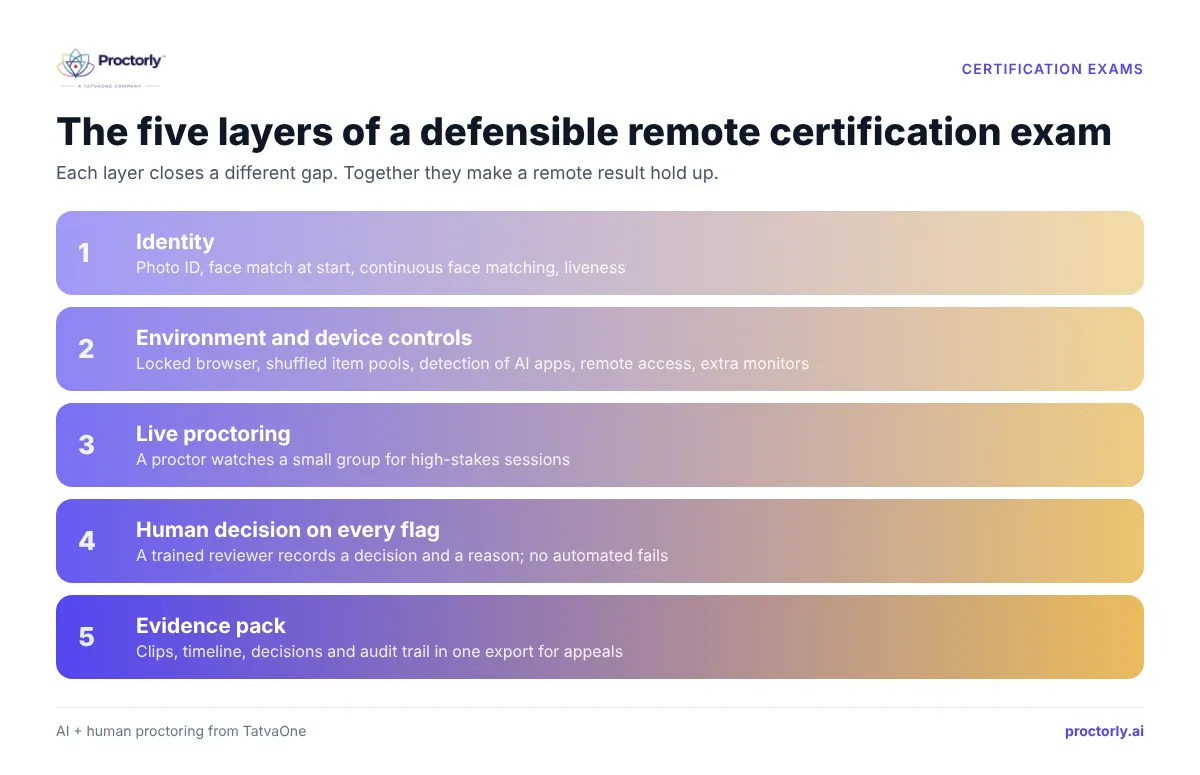
The five layers of a defensible remote certification exam
1. Identity: prove the right person sat the exam
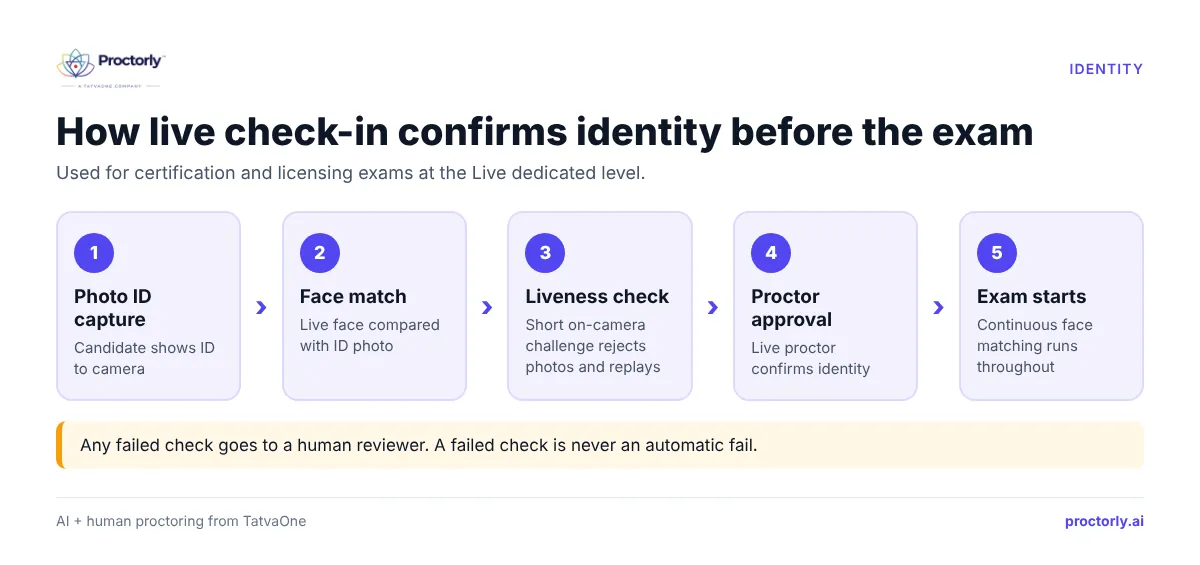
For certification, a login is not identity. Strong programs use photo ID capture, a face match at the start, and continuous face matching during the session. Add an active liveness challenge to stop photos or videos held up to the camera. For the highest-stakes exams, a live proctor confirms identity at check-in. Proctorly’s identity verification covers each of these steps and logs every check separately in the case record.
2. Environment and device controls
Run the exam in a locked browser session and shuffle questions from item pools so no two candidates see the same order. Detection should cover the tools people actually use today: generative-AI apps, phones, remote-access and screen-sharing software, virtual machines, browser extensions and extra monitors. For programs that need deeper checks, an optional desktop agent can look at running apps and USB devices without reading documents.
3. Live proctoring for high-stakes sessions
Automated monitoring scales well, but licensure and professional certification usually justify a person watching in real time. In Proctorly’s Live dedicated level, a proctor watches a small group for the full session. Certification bodies can also use their own proctors inside Proctorly’s software if their rules require it.
4. Human decisions on every flag
AI is good at noticing things. It is bad at knowing whether they matter. A candidate reading a question aloud, an assistive tool, or a webcam that drops out can all look suspicious to software. That is why every flag in Proctorly goes to a trained human reviewer who records a decision and a reason, and no automated flag can fail a candidate or impose a sanction.
5. An evidence pack you can hand to an appeals panel
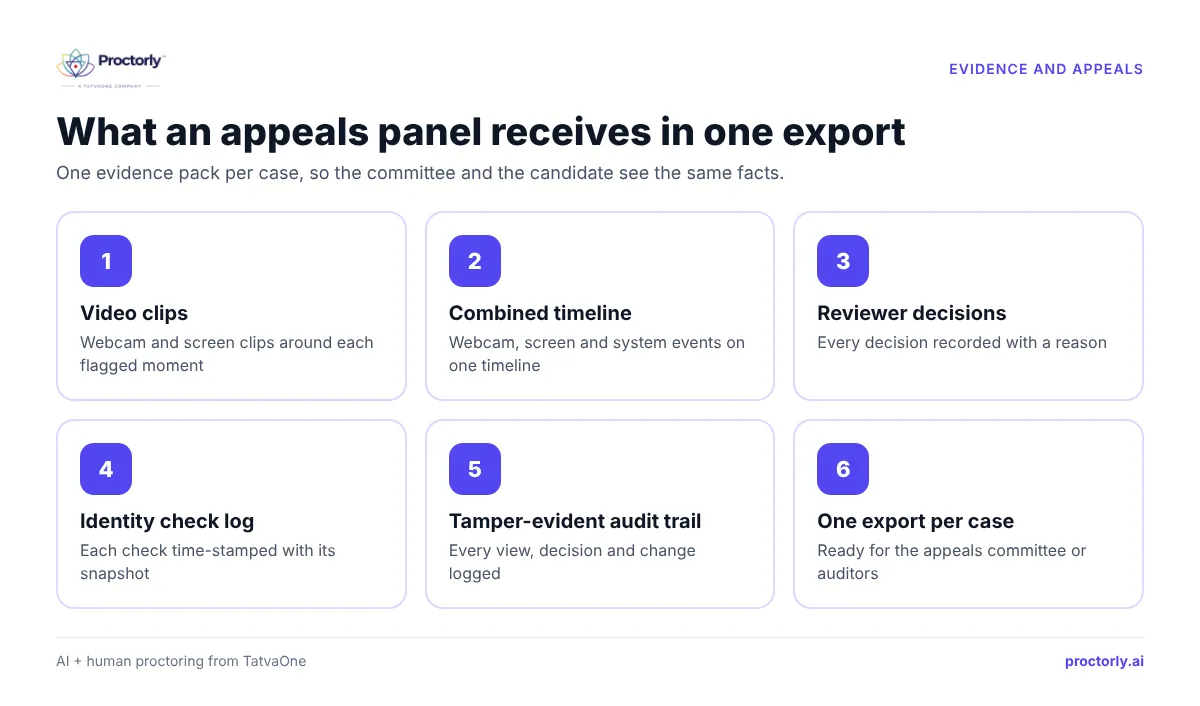
When a case is confirmed, export one evidence pack per case: clips, a combined timeline of webcam, screen and events, reviewer decisions and audit entries. A tamper-evident audit trail shows who viewed or changed what. Your committee and the candidate then argue from the same facts.
See a real evidence pack and live check-in flow. Book a Proctorly demo.
How to roll out remote certification exams in 6 steps
- Classify your exams by stakes. List every exam form and tag it: practice, member quiz, continuing education, certification, licensure.
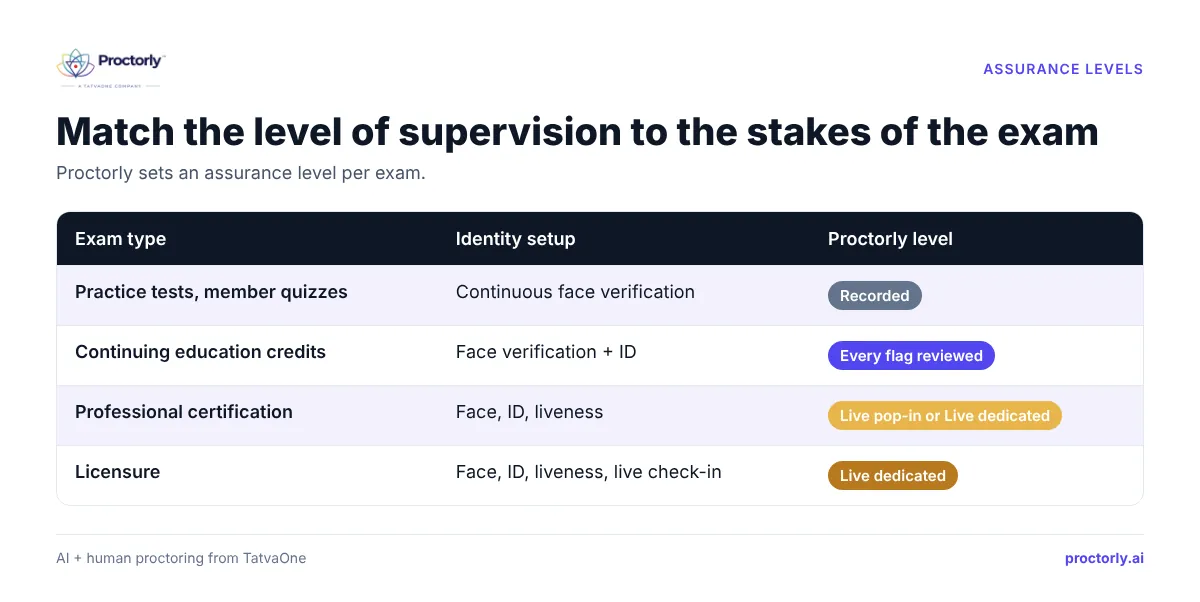
- Set an assurance level per exam. Match identity checks and monitoring to the stakes (see the table below).
- Write the candidate rules. Desk, room, ID, breaks, accommodations, what happens if the connection drops. Publish them before booking opens.
- Run a system check campaign. Send candidates to a system check at booking and again 48 hours before the exam.
- Pilot with one cohort. Pick one exam form and one region. Compare pass rates, incident rates and candidate feedback with your test-centre baseline.
- Agree the decision workflow. Decide who reviews escalated cases, how fast, and how appeals use the evidence pack. Then scale.
The ITC and ATP Guidelines for Technology-Based Assessment are a useful checklist for steps 3 to 6, especially on test security and fairness (SIOP summary).
Choosing the right assurance level for each exam
| Exam type | Identity setup | Suggested Proctorly level |
|---|---|---|
| Practice tests, member quizzes | Continuous face verification | Recorded |
| Continuing education credits | Face verification + ID | Every flag reviewed |
| Professional certification | Face, ID, liveness | Live pop-in or Live dedicated |
| Licensure | Face, ID, liveness, live check-in | Live dedicated |
People also ask
Are online proctored certification exams as valid as test-centre exams? They can be, when identity, environment controls and human review are strong. CompTIA reports equivalence between its two delivery modes.
Can a certification body use its own proctors? With Proctorly, yes. You can use your own proctors inside the software or use Proctorly’s reviewers, who work 24×7 during exam windows.
What equipment do candidates need? A laptop, desktop, tablet or phone with a camera and microphone, a supported browser, and at least 512 Kbps download and 128 Kbps upload.
FAQs
How does online proctoring stop impersonation in certification exams?
By layering photo ID capture, face matching at the start and throughout the session, liveness checks and, for high-stakes exams, a live check-in by a proctor. Any failed check goes to a person rather than triggering an automatic fail.
Where is candidate data stored?
Proctorly hosts data in the client’s region by default, with options for any AWS region or the client’s own S3 bucket. Retention follows your exam policy, and candidate data is not used to train AI unless you opt in. See the Trust Center.
Is remote proctoring right for every certification board?
Not always. Some boards require in-person delivery for certain exams. Proctorly Examination can run the same exam at centres and online, so you can mix delivery modes. Book a meeting to check fit for your rules.
How quickly are flags reviewed?
Proctorly reviews 95 of every 100 flags within 5 minutes during exam windows, at a ratio of one reviewer per 40 candidates.
Can we pilot before committing?
Yes. Most programs start with one exam form and one cohort. Book a demo to plan a pilot.
Bring your next certification window online
Remote delivery widens your candidate pool and cuts test-centre costs, but only if your credential keeps its value. Strong identity checks, live proctoring where it matters, a person behind every decision and an evidence pack for appeals give you that. See how it works for certification and licensing bodies.
Ready to plan your rollout? Book a Demo or Book a Meeting with the Proctorly team.